Add a Watermark to a PDF to Protect Your Work
Brand your documents or mark drafts with text or image watermarks.
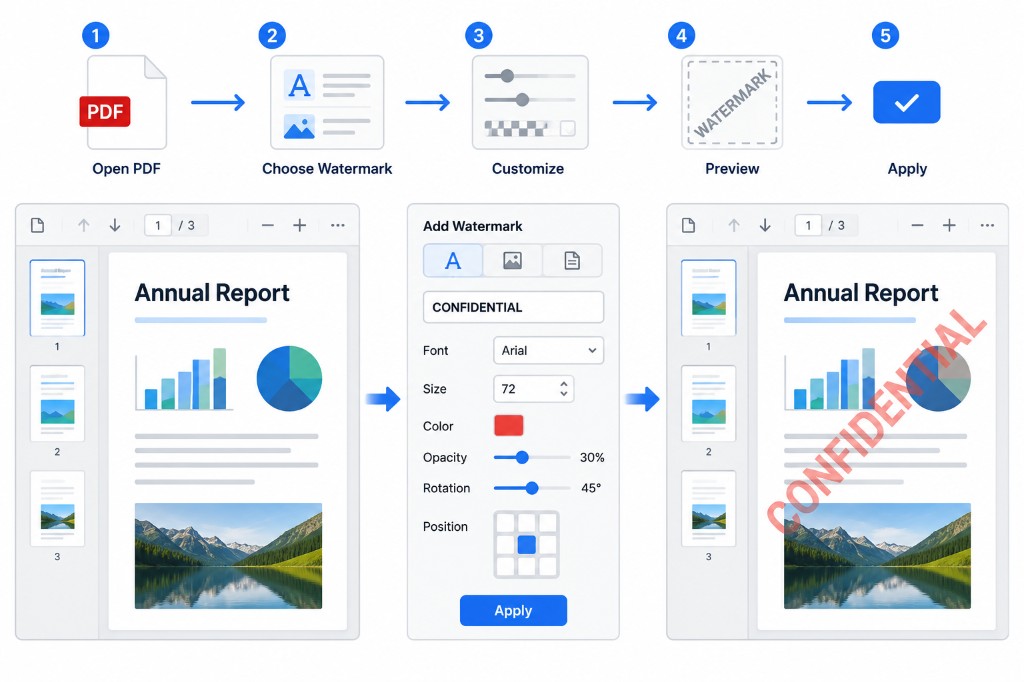
Two reasons to watermark: ownership and status. A company logo says where the file came from. A DRAFT or CONFIDENTIAL label says how to treat it. Both reduce confusion when multiple versions circulate.
Add Watermark stamps text or an image on every page in your browser. Upload, enter your label or pick a logo, set position, opacity, and rotation, then apply and download.
Opacity is the setting people get wrong most often. Too high and the stamp fights the content. Too low and it disappears in print. Aim for visible but not dominant — roughly thirty to forty percent opacity is a good starting point for text watermarks.
Tiled watermarks cover more surface area, which helps if you worry about screenshots. Text is faster to set up; images work better for brand marks. The watermark is embedded in the export, not a removable comment.